
DotMake Svg-Sprite
A dotnet tool and a library for building or extracting of an SVG sprite, i.e. a .svg file with child <symbol> tags.
There was no proper tool for .NET (there are some for npm) for handling SVG sprites so this tool is created. It could be useful in MSBuild targets or build scripts, especially for web applications.


Getting started
Install the dotnet tool or the library from NuGet.
For using the dotnet tool: install via dotnet cli:
dotnet tool install --global svg-spriteFor using the library: in your project directory, add via dotnet cli:
dotnet add package DotMake.SvgSprite
Prerequisites
For using the dotnet tool: .NET SDK 8.0 and later. The .NET CLI (
dotnetcommand) is included with the .NET SDK.For using the library: .NET Standard 2.0 and later project.
Note that .NET Framework 4.7.2+ or .NET Core 2.0+ or .NET 5.0+ projects can reference our netstandard2.0 target (automatic in nuget).
Usage
Dotnet tool usage
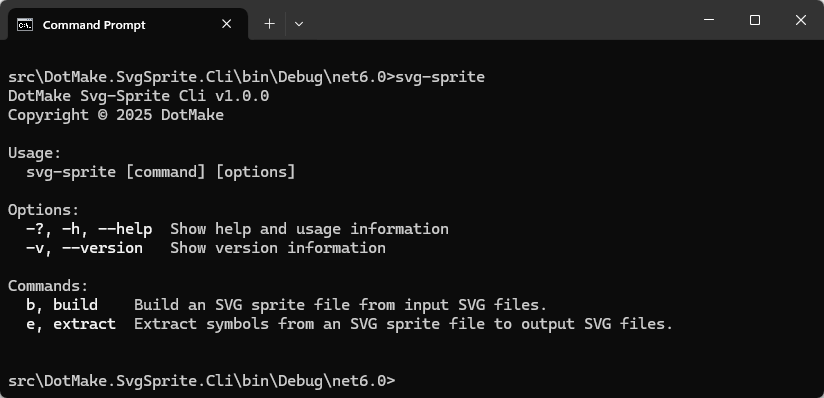
Use build command to build an SVG sprite file from input SVG files:
svg-sprite build inputs\*.svg -o sprite.svg

svg-sprite build inputs\*.svg inputs2\*.svg -o sprite2.svg
Overwrite existing output file:
svg-sprite build inputs\*.svg -o sprite.svg -O
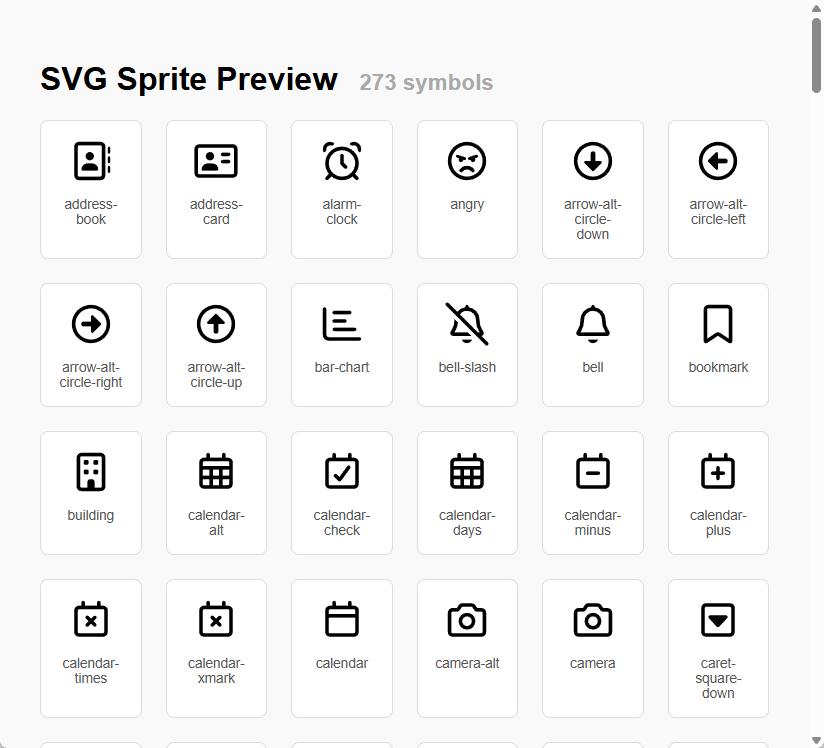
Create an HTML page next to the output SVG sprite file, for previewing/testing the symbols inside the SVG sprite:
svg-sprite build inputs\*.svg -o sprite.svg -p
Note that <use> tag does not work cross-origin, including local HTML files (when not viewed from a web server),
so we put/inline the SVG sprite into HTML for the preview page.
Minify the output SVG sprite file, i.e. remove whitespace to reduce file size for web use:
svg-sprite build inputs\*.svg -o sprite.svg -m
All options for build command:
Usage:
  svg-sprite build <input-files>... [options]

Arguments:
  <input-files>  The input SVG files to build an SVG sprite file, i.e. to add as <symbol> tags to the output SVG sprite
                 file. Duplicate files (same name and size and date modified) will be ignored.
                 Patterns in paths are supported:
                 - ? matches a single character
                 - * matches zero or more characters
                 - ** matches zero or more recursive directories, e.g. a\**\x matches a\x, a\b\x, a\b\c\x, etc.
                 - [...] matches a set of characters, syntax is the same as character groups in Regex.
                 - {group1,group2,...} matches any of the pattern groups. Groups can contain groups and patterns, e.g.
                 {a\b,{c,d}*}.
                  [required]

Options:
  -o, --output-file <output-file>                      The output SVG sprite file which will contain added <symbol>
                                                       tags. [required]
  -O, --overwrite-existing                             Overwrite existing files. [default: False]
  -p, --html-preview                                   Create an HTML page next to the output SVG sprite file, for
                                                       previewing the symbols inside the SVG sprite. [default: False]
  -m, --minify                                         Minify the SVG output, i.e. disable formatting output, not write
                                                       individual elements on new lines and indent. [default: False]
  -a, --attributes-to-discard <attributes-to-discard>  The attributes to discard when converting <svg> tag to <symbol>
                                                       tag or vice versa.
                                                       Wildcards can be used: * - Zero or more characters, ? - Exactly
                                                       one character.
                                                       Attributes that should be usually preserved on <symbol> tag:
                                                       - viewBox — must be preserved on <symbol> to define coordinate
                                                       system
                                                       - id — required for referencing the symbol later
                                                       - fill, stroke, opacity, transform — if used for styling
                                                       - class, style — if CSS is applied
                                                       - width and height — optional; usually omitted in sprites
  -e, --elements-to-discard <elements-to-discard>      The elements to discard when converting <svg> tag to <symbol>
                                                       tag or vice versa.
                                                       Wildcards can be used: * - Zero or more characters, ? - Exactly
                                                       one character.
                                                       Elements that should be usually preserved inside <symbol> tag:
                                                       - <path> — most common for icons
                                                       - <circle>, <rect>, <line>, <polygon>, <polyline> — basic shapes
                                                       - <g> — groups of elements (preserve if used for structure or
                                                       styling)
                                                       - <text> — if your icon includes text
                                                       - <use> — if referencing other symbols
                                                       - <defs> — only if it contains reusable elements like gradients
                                                       or filters used inside the symbol
  -i, --id-prefix <id-prefix>                          The prefix to add to the id attribute when converting <svg> tag
                                                       to <symbol> tag or vice versa.
  -I, --id-for-missing <id-for-missing>                The value to use when id attribute is missing or is not
                                                       specified when converting <svg> tag to <symbol> tag or vice
                                                       versa.
                                                       When there are duplicates, this value will be incremented like
                                                       symbol-2, symbol-3 etc. [default: symbol]
  -r, --id-replacement-char <id-replacement-char>      The replacement character when sanitizing the id attribute when
                                                       converting <svg> tag to <symbol> tag or vice versa.
                                                       Allowed values are '-', '_', '.'. Setting any other value will
                                                       disable sanitizing [default: -]
  -l, --id-lower-cased                                 The value indicating whether to convert the id attribute to
                                                       lowercase when converting <svg> tag to <symbol> tag or vice
                                                       versa. [default: True]
  -b, --view-box-override <view-box-override>          The override value to use for all viewBox attributes, e.g. "0 0
                                                       24 24" when converting <svg> tag to <symbol> tag or vice versa.
  -c, --comments-preserved                             The value indicating whether to preserve comments when
                                                       converting <svg> tag to <symbol> tag or vice versa. [default:
                                                       False]
  -?, -h, --help                                       Show help and usage information
Use extract command to extract symbols from an SVG sprite file to individual SVG files:
svg-sprite extract sprite.svg -o outputs\
Overwrite existing output SVG files:
svg-sprite extract sprite.svg -o outputs\ -O
Minify the output SVG files, i.e. remove whitespace to reduce file size for web use:
svg-sprite extract sprite.svg -o outputs\ -m
All options for extract command:
Usage:
  svg-sprite extract <input-file> [options]

Arguments:
  <input-file>  The input SVG sprite file to extract symbols from, i.e. to extract <symbol> tags to individual SVG
                files. [required]

Options:
  -o, --output-directory <output-directory>            The output directory to write extracted SVG files. [required]
  -O, --overwrite-existing                             Overwrite existing files. [default: False]
  -m, --minify                                         Minify the SVG output, i.e. disable formatting output, not write
                                                       individual elements on new lines and indent. [default: False]
  -a, --attributes-to-discard <attributes-to-discard>  The attributes to discard when converting <svg> tag to <symbol>
                                                       tag or vice versa.
                                                       Wildcards can be used: * - Zero or more characters, ? - Exactly
                                                       one character.
                                                       Attributes that should be usually preserved on <symbol> tag:
                                                       - viewBox — must be preserved on <symbol> to define coordinate
                                                       system
                                                       - id — required for referencing the symbol later
                                                       - fill, stroke, opacity, transform — if used for styling
                                                       - class, style — if CSS is applied
                                                       - width and height — optional; usually omitted in sprites
  -e, --elements-to-discard <elements-to-discard>      The elements to discard when converting <svg> tag to <symbol>
                                                       tag or vice versa.
                                                       Wildcards can be used: * - Zero or more characters, ? - Exactly
                                                       one character.
                                                       Elements that should be usually preserved inside <symbol> tag:
                                                       - <path> — most common for icons
                                                       - <circle>, <rect>, <line>, <polygon>, <polyline> — basic shapes
                                                       - <g> — groups of elements (preserve if used for structure or
                                                       styling)
                                                       - <text> — if your icon includes text
                                                       - <use> — if referencing other symbols
                                                       - <defs> — only if it contains reusable elements like gradients
                                                       or filters used inside the symbol
  -i, --id-prefix <id-prefix>                          The prefix to add to the id attribute when converting <svg> tag
                                                       to <symbol> tag or vice versa.
  -I, --id-for-missing <id-for-missing>                The value to use when id attribute is missing or is not
                                                       specified when converting <svg> tag to <symbol> tag or vice
                                                       versa.
                                                       When there are duplicates, this value will be incremented like
                                                       symbol-2, symbol-3 etc. [default: symbol]
  -r, --id-replacement-char <id-replacement-char>      The replacement character when sanitizing the id attribute when
                                                       converting <svg> tag to <symbol> tag or vice versa.
                                                       Allowed values are '-', '_', '.'. Setting any other value will
                                                       disable sanitizing [default: -]
  -l, --id-lower-cased                                 The value indicating whether to convert the id attribute to
                                                       lowercase when converting <svg> tag to <symbol> tag or vice
                                                       versa. [default: True]
  -b, --view-box-override <view-box-override>          The override value to use for all viewBox attributes, e.g. "0 0
                                                       24 24" when converting <svg> tag to <symbol> tag or vice versa.
  -c, --comments-preserved                             The value indicating whether to preserve comments when
                                                       converting <svg> tag to <symbol> tag or vice versa. [default:
                                                       False]
  -?, -h, --help                                       Show help and usage information
Library usage
Refer to DotMake Svg-Sprite API docs for more details.
Use SvgSpriteBuilder.AddSymbol() method to build an SVG sprite file from input SVG files:
//Build an SVG sprite file from input SVG files

var svgDocument = new SvgDocument();
var svgSpriteBuilder = new SvgSpriteBuilder(svgDocument);

foreach (var file in Directory.EnumerateFiles(@"inputs\", "*.svg"))
{
    var svgDocumentToAdd = new SvgDocument(file);
    var symbolId = Path.GetFileNameWithoutExtension(file);

    svgSpriteBuilder.AddSymbol(svgDocumentToAdd, symbolId);
}

svgDocument.Save(@"sprite.svg");
//Build an SVG sprite file from input SVG files with custom options

var svgDocument = new SvgDocument();
var svgSpriteBuilder = new SvgSpriteBuilder(svgDocument);
var svgSymbolOptions = new SvgSymbolOptions
{
    //These are default values for options
    AttributesToPreserve = new[] { "id", "viewBox", "class", "style", "fill", "stroke", "opacity", "transform" },
    ElementsToPreserve = new[] { "*" },
    IdForMissing = "symbol",
    IdReplacementChar = '-',
    IdLowerCased = true
};

foreach (var file in Directory.EnumerateFiles(@"inputs\", "*.svg"))
{
    var svgDocumentToAdd = new SvgDocument(file);
    var symbolId = Path.GetFileNameWithoutExtension(file);

    svgSpriteBuilder.AddSymbol(svgDocumentToAdd, symbolId, svgSymbolOptions);
}

svgDocument.Save(@"sprite.svg");
Use SvgSpriteBuilder.ExtractSymbol() method to extract symbols from an SVG sprite file to individual SVG files:
//Extract symbols from an SVG sprite file to individual SVG files

var svgDocument = new SvgDocument(@"sprite.svg");
var svgSpriteBuilder = new SvgSpriteBuilder(svgDocument);
var outputDirectory = @"outputs\";

foreach (var symbolId in svgSpriteBuilder.GetSymbolIds())
{
    var svgDocumentToExtract = svgSpriteBuilder.ExtractSymbol(symbolId);
    var svgFile = Path.Combine(outputDirectory, Path.ChangeExtension(symbolId, ".svg"));

    Directory.CreateDirectory(outputDirectory);
    svgDocumentToExtract.Save(svgFile);
}
//Extract symbols from an SVG sprite file to individual SVG files with custom options

var svgDocument = new SvgDocument(@"sprite.svg");
var svgSpriteBuilder = new SvgSpriteBuilder(svgDocument);
var svgSymbolOptions = new SvgSymbolOptions
{
    //These are default values for options
    AttributesToPreserve = new[] { "id", "viewBox", "class", "style", "fill", "stroke", "opacity", "transform" },
    ElementsToPreserve = new[] { "*" },
    IdForMissing = "symbol",
    IdReplacementChar = '-',
    IdLowerCased = true
};
var outputDirectory = @"outputs\";

foreach (var symbolId in svgSpriteBuilder.GetSymbolIds())
{
    var svgDocumentToExtract = svgSpriteBuilder.ExtractSymbol(symbolId, svgSymbolOptions);
    var svgFile = Path.Combine(outputDirectory, Path.ChangeExtension(symbolId, ".svg"));

    Directory.CreateDirectory(outputDirectory);
    svgDocumentToExtract.Save(svgFile);
}
Use SvgSpriteBuilder.CreatePreviewPage() method to create an HTML page for previewing the symbols inside the SVG sprite:
//Create an HTML page for previewing the symbols inside the SVG sprite

var svgDocument = new SvgDocument(@"sprite.svg");
var svgSpriteBuilder = new SvgSpriteBuilder(svgDocument);

var html = svgSpriteBuilder.CreatePreviewPage();
File.WriteAllText(@"preview.html", html);
Note that <use> tag does not work cross-origin, including local HTML files (when not viewed from a web server),
so we put/inline the SVG sprite into HTML for the preview page.
Using SVG sprites
Once you have an SVG sprite, for example sprite.svg like this:
<svg xmlns="http://www.w3.org/2000/svg">

  <symbol viewBox="0 0 640 640" id="address-book">
    <path fill="currentColor" d="M448 112C456.8 112 464 119.2 464 128L464 512C464 520.8 456.8 528 448 528L160 528C151.2 528 144 520.8 144 512L144 128C144 119.2 151.2 112 160 112L448 112zM160 64C124.7 64 96 92.7 96 128L96 512C96 547.3 124.7 576 160 576L448 576C483.3 576 512 547.3 512 512L512 128C512 92.7 483.3 64 448 64L160 64zM304 312C334.9 312 360 286.9 360 256C360 225.1 334.9 200 304 200C273.1 200 248 225.1 248 256C248 286.9 273.1 312 304 312zM272 352C227.8 352 192 387.8 192 432C192 440.8 199.2 448 208 448L400 448C408.8 448 416 440.8 416 432C416 387.8 380.2 352 336 352L272 352zM576 144C576 135.2 568.8 128 560 128C551.2 128 544 135.2 544 144L544 208C544 216.8 551.2 224 560 224C568.8 224 576 216.8 576 208L576 144zM560 256C551.2 256 544 263.2 544 272L544 336C544 344.8 551.2 352 560 352C568.8 352 576 344.8 576 336L576 272C576 263.2 568.8 256 560 256zM576 400C576 391.2 568.8 384 560 384C551.2 384 544 391.2 544 400L544 464C544 472.8 551.2 480 560 480C568.8 480 576 472.8 576 464L576 400z" />
  </symbol>

  <symbol viewBox="0 0 640 640" id="alarm-clock">
    <path fill="currentColor" d="M466.6 114.2C461.2 115.9 455.3 116 450.4 113.3C444.6 110.1 438.6 107.1 432.6 104.4C422.2 99.7 418.9 86.1 428.5 79.8C443.5 69.9 461.5 64.1 480.8 64.1C533.4 64.1 576 106.7 576 159.3C576 172.5 573.3 185.1 568.4 196.6C563.9 207.1 550 206.4 543.5 197C539.7 191.5 535.7 186.2 531.5 181C528 176.6 527 170.8 527.7 165.2C527.9 163.3 528.1 161.3 528.1 159.3C528.1 133.2 506.9 112.1 480.9 112.1C476 112.1 471.2 112.9 466.7 114.3zM96.5 196.9C90 206.3 76 207 71.6 196.5C66.7 185 64 172.4 64 159.2C64 106.6 106.6 64 159.2 64C178.5 64 196.5 69.8 211.5 79.7C221.1 86 217.8 99.6 207.4 104.3C201.3 107.1 195.4 110 189.6 113.2C184.7 115.9 178.7 115.8 173.4 114.1C168.9 112.7 164.2 111.9 159.2 111.9C133.1 111.9 112 133.1 112 159.1C112 161.1 112.1 163.1 112.4 165C113.1 170.6 112.1 176.4 108.6 180.8C104.4 186 100.4 191.3 96.6 196.8zM496 352C496 254.8 417.2 176 320 176C222.8 176 144 254.8 144 352C144 449.2 222.8 528 320 528C417.2 528 496 449.2 496 352zM460.5 526.5C422.1 557.4 373.2 576 320 576C266.8 576 217.9 557.4 179.5 526.5L137 569C127.6 578.4 112.4 578.4 103.1 569C93.8 559.6 93.7 544.4 103.1 535.1L145.6 492.6C114.6 454.1 96 405.2 96 352C96 228.3 196.3 128 320 128C443.7 128 544 228.3 544 352C544 405.2 525.4 454.1 494.5 492.5L537 535C546.4 544.4 546.4 559.6 537 568.9C527.6 578.2 512.4 578.3 503.1 568.9L460.6 526.4zM344 248L344 342.1L385 383.1C394.4 392.5 394.4 407.7 385 417C375.6 426.3 360.4 426.4 351.1 417L303.1 369C298.6 364.5 296.1 358.4 296.1 352L296.1 248C296.1 234.7 306.8 224 320.1 224C333.4 224 344.1 234.7 344.1 248z" />
  </symbol>

</svg>
You can use symbols from this sprite in your HTML pages like this:
<svg>
  <use href="sprite.svg#address-book" />
</svg>

<svg style="width: 48px; height: 48px;">
  <use href="sprite.svg#alarm-clock" />
</svg>
Note that <use> tag does not work cross-origin, including local HTML files (when not viewed from a web server),
so in that case you should put/inline the SVG sprite into your HTML page and
then you should only include the URL fragment in href attribute:
<svg>
  <use href="#address-book" />
</svg>

<svg style="width: 48px; height: 48px;">
  <use href="#alarm-clock" />
</svg>
Note that for <use> tag, the old attribute xlink:href is deprecated and the attribute href is used since browser
versions released from 2016-2019.
Building
We provide some .cmd batch scripts in build folder for easier building:
1. Build Cli.cmd
2. Build Nuget Packages.cmd
3. Build Api Docs WebSite.cmd
Output results can be found in publish folder, for example:
DotMake.SvgSprite.Cli-net8.0

svg-sprite.2.0.0.nupkg
DotMake.SvgSprite.2.0.0.nupkg
Links
- DotMake Svg-Sprite Documentation
- DotMake Svg-Sprite API Reference
- Release Notes
- NuGet Package for Tool
- NuGet Package for Library